
QwertyZen
Awaken your inner musician
QwertyZen Community Edition is a free PC application that turns your computer into a versatile and intuitive musical instrument.
Hobbyists to professionals, students to teachers, everyone will love making and playing music.
Features
What testers are saying
Featured posts
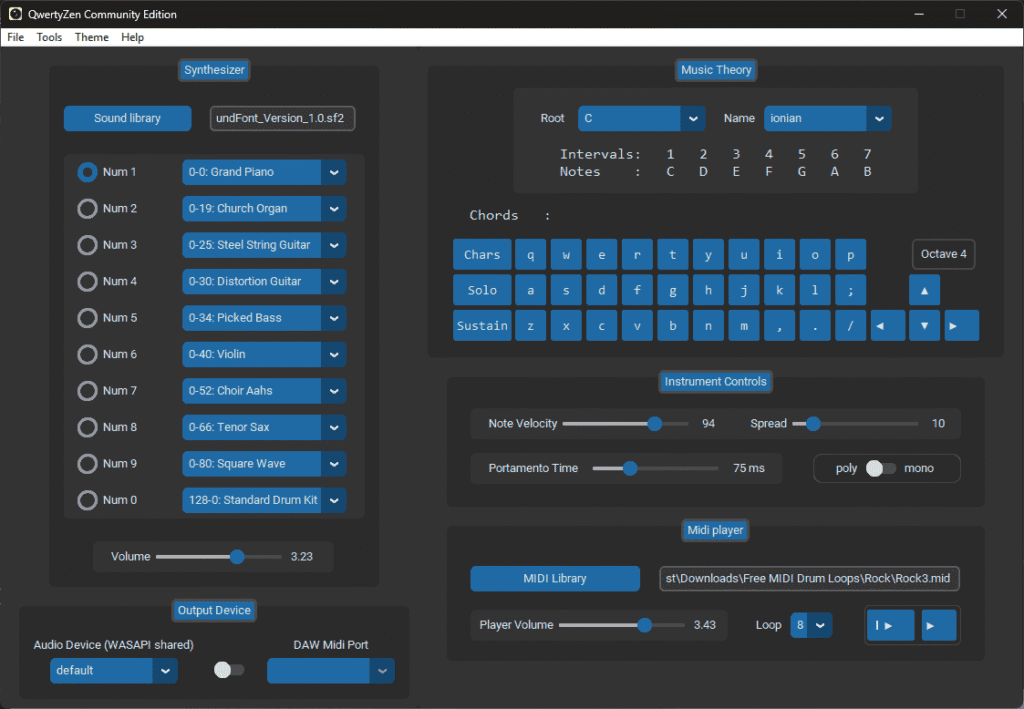
Getting started with QwertyZen Community Edition (Windows)
Upcoming features
These are the features we are working on for our users Support for all keyboard…




Frequently Asked Questions
Getting Started
What platform does QwertyZen support?
QwertyZen Community Edition runs on Windows, MacOS, and Linux. We will bring support for mobile devices gradually.
Is this an AI generated music software?
No. QwertyZen Community Edition turns your PC into a musical instrument out-of-the-box. It has many assistive tools that make the process of making and learning music easier and fun. Ultimately you are in control of the outcome. You can use it as a pair with any other music related software or hardware, including Digital Audio Workstations (DAW), synthesizers, and AI apps like Suno, Udio, etc.
Is QwertyZen Community Edition really free?
Yes. It is completely free for personal use. If you are a producer, or educational institute, or other, please email us at admin[at]qwertyzen[dot]com with the subject “Commercial License for QwertyZen Community Edition”.
Can I use QwertyZen without a MIDI keyboard or external hardware?
Absolutely. QwertyZen Community Edtion is built for anyone with just a computer. You don’t need a MIDI keyboard, audio interface, or any external gear. Your regular keyboard becomes the instrument, and QwertyZen handles all the expression and sound generation internally. It runs smoothly on most machines (even older ones). You can simply install it, run it, and get the full experience right out of the box.
Does QwertyZen Community Edition work offline?
Yes. Internet connection is not required to run. QwertyZen uses the internet only to check for updates to the software, and when the user downloads soundfont files within the app.
Playing music with QwertyZen
Can I use QwertyZen to play along with YouTube or MIDI files?
Certainly. You can play backing tracks, songs, music videos, find the scale and jam along with it on QwertyZen. QwertyZen has an internal MIDI file organizer and player. You can play along with MIDI files. Simply select a MIDI file, press Enter to play, and play along. Press enter to stop playback. Read more in the user guide.
Can I play QwertyZen Community Edition with others?
You can do anything with QwertyZen that you can with any musical instrument. The sky is the limit. For example:
- 3-4 people with laptops can instantly jam and play a song.
- You can play QwertyZen live in a band.
- You can collaborate on the same project while using QwertyZen.
- Learn music, discuss musical concepts, or simply geek out over sounds.
QwertyZen Community Edition is designed to add to your existing musical workflow.
Can I connect QwertyZen to Ableton/Logic/FL Studio?
Yes. You can connect with any other audio application on your computer for synthesis, or multi-track recording. The idea is that Ableton/Logic/FL Studio will see QwertyZen as an audio and MIDI device. You can record the audio of the synth directly, or take the MIDI signal and use plugins or synths of your choice. You will need a few 3rd party tools to enable this feature. This is dicussed in the user guide and other FAQ.
Troubleshooting and Common Issues
I got an error window with cryptic messages. What should I do?
You found a bug or an edge case that we have not anticipated. Please copy the entire message and send it to us at support[at]qwertyzen[dot]com with the subject “Bug report”. Also tell us which version you are using and on which OS. We will fix it in the upcoming update. Thank you for your help.
The sound output is delayed after the keystroke. How can I reduce latency?
If you are on Windows, please check if you have any audio filter app installed on your PC. We have encountered cases when disabling such global filters and EQs fixed the latency issue. If not, ensure that you have the latest version of QwertyZen installed. You can also try different soundfonts and output devices to check that those are not the culprits. If the issue still persists, please reach out to us as support[at]qwertyzen[dot]com and we will help you solve the issue.